| Legler Systems Company | | | CR System | | | Contact Us | | | Help | | | Home | | |
The Check Reconciliation System (CRS) developed by Legler Systems in California (CA) is based on the client-server model and supports many special features for handling the reconciliation of checking accounts in small to midsize businesses. Multiple bank checking accounts are supported to handle issued checks by the company and paid checks by the bank. This customizable CRS software can be run as a stand-alone accounting application or integrated with other financial modules, such as the Accounts Payable System (vendor checks) and Payroll System (payroll checks). This online Check Reconciliation software utilizes a character-based user interface with mouse support on desktop or laptop computers for fast data entry and optimum end-user productivity in a multi-user environment.
The latest CRS software version is now available with recent changes described in the Accounting Software Revision History document. The latest updates include four different real-time transaction dashboards under the check reconciliation menu, plus the Report History Dashboard showing the prior runs for each reporting procedure and inquiry procedure. This general-purpose Check Reconciliation System is easy to use and can function with or without a mouse for greater end-user flexibility and productivity.
After installations on different hardware and operating systems, this reliable check reconciliation software has evolved over the last 25 years to an efficient, proven and productive business application for today under Microsoft Windows 10. Custom versions of the online CRS software support in-house control of confidential check payment records and have been in day-to-day operation in small businesses in Northern California for many years.
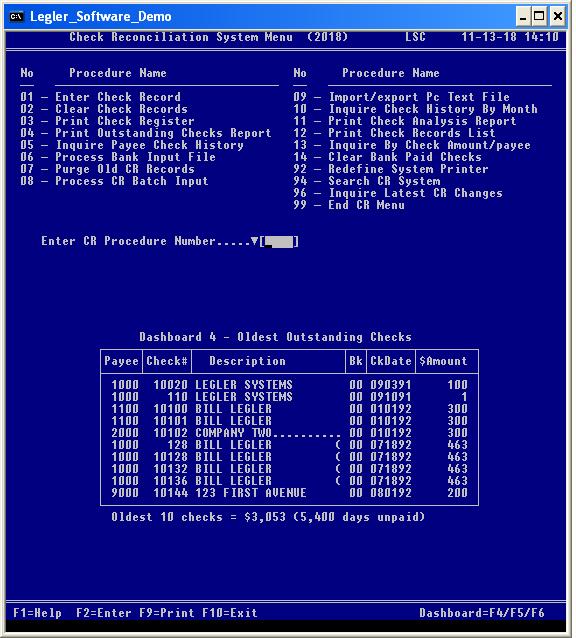
The online check reconciliation (CR) accounting procedures are identified on the Check Reconciliation System Menu (screen image shown below). Before any online CR procedure is run, the user must first sign-on by entering a valid User-ID and password. To display the Check Reconciliation menu from the main Financial Menu, enter "CR" to the System-ID prompt. To start a specific CR accounting procedure, enter the 2-digit number associated with that online accounting procedure or single-click the left mouse button when pointing to the accounting procedure name on the Check Reconciliation System Menu screen. The active keyboard function keys are identified at the bottom of all screens, including the check reconciliation menu.
Data entry procedure CR01 (screen image) displays the data fields that comprise each Check Record and performs the update functions (add, modify and delete) to the online Master File (DBSMST) based on a Transaction Code. Generally, issued checks printed by the AP System (vendor checks) and PR System (payroll checks) are automatically posted to the CR System with the Check-Status code set to "I" (issued). The vendor checks can be associated with a different bank checking account than employee payroll checks. Manual business checks are entered directly online using data entry procedure CR01. The Check Reconciliation Data Dictionary (printed by procedure DB11) defines each data field in data entry screen CR01.
The online Help File contains a description of all CR data fields and CR error messages that are displayed in a separate Help Message Window whenever keyboard function key F1 is pressed. A drop-down list of valid codes for a field (marked by a down-arrowhead) is also shown in the Help Message Window when the F2 key is pressed after the F1 key. The Help Message Window temporarily overlays the bottom half of the basic application window (Command Prompt window).
For all CR inquiry procedures and reporting procedures, a selection screen is displayed so the user can enter various data selection parameters to retrieve specific check records from the online database (DBSMST) and to format the output screen or report. Prior data selection parameters are shown in the Report History Dashboard under the selection screen.
Clear check procedure CR02 enables the user to enter a single check number or a range of unpaid checks from the bank statement that have cleared the bank. Clear Bank Paid Checks procedure CR14 (screen image) is similar to CR02, except all outstanding checks are displayed for the user to flag only those unpaid checks that have been cleared (paid by) the bank without having to enter each check numbers. For larger organizations, a magnetic tape or personal computer disk file of cleared checks received from the bank are processed by procedure CR06 instead of using data entry procedure CR02. Issued checks printed by another computerized system or imported by update procedure DB18 are edited and loaded into the online CR System using update procedure CR08.
Online inquiry procedure CR05 displays issued and cleared (paid by the bank) check information for a specific payee (vendor or employee), while CR10 displays a results screen by month for 5 years of paid checks. Inquiry procedure CR13 allows the user to search for a specific check amount. Inquire Latest CR Changes procedure (CR96) displays a list of the latest Check Records (CR01) in descending chronological date sequence.
Online reporting procedures CR03, CR04, CR11 and CR12 print management reports on a line printer (computer-size paper) or the basic laser printer (letter-size paper). Management reports can be displayed in the application window or in a separate report window prior to printing a hardcopy. The Outstanding Checks Report (CR04) identifies all unpaid checks and is used in balancing bank checking account dollar amounts to the bank statement. Each online reporting procedure displays a separate selection screen for the user to enter report selection parameters, such as dates, check number, report format option and report sort option. Update procedures CR02, CR06, CR07, CR08 and CR09 print a one-page CRS Control Report showing the number of check records processed for audit documentation.
Check reconciliation procedure 92, procedure 94 and procedure 96 are the same procedures in the Database Control System. When 99 is entered as the CR procedure number, the main Financial Menu is displayed. End-user procedures DB11 and DB18 appear only on the Database Control menu.
Each online CR accounting procedure identified on the Check Reconciliation System Menu is described in more detail in the CR Procedure Menu document, including a description of the check reconciliation transaction dashboards and Report History Dashboard.
In addition to the operational, security, technical and customization features mentioned in the Accounting Software Overview document, important Functional Features and Objectives of this proven check reconciliation software are highlighted below:
1. Automatic matching of paid or cleared checks against those issued by the company, including the automatic setting of a Check-Status code to indicate the current status (issued, voided, or cleared) of each check number in the CR System.
2. Ability to import/export check information to/from the CR System is performed using update procedure CR09, where the user specifies the data fields to be processed and written to a comma separated value (CSV) data file. Alternatively, procedure DB18 can be used to import or export check payment data to a variable length Text File (CSV data File). Generally, a csv data file uses the internal ASCII coding structure.
3. Multiple bank checking accounts are supported in the Legler CR System by specifying different Bank-ID codes.
4. The Print Check Register procedure CR03 has an option to print all missing check numbers for audit documentation and comparison to the management report printed by procedure CR04.
5. A batch date or bank statement date is associated with each check cleared online to facilitate balancing checking accounts in the accounting software to actual bank statements.
6. Flexible online reporting procedures allow the user to request and print 24 different Check Reconciliation Reports by specifying report selection parameters and a report sort option. For example, the Outstanding Checks Report printed by procedure CR04 prompts the user for a Bank-ID code, ending date and report sort option. One-time ad-hoc management reports are easily printed.
7. For real-time List Dashboard (No. 4), the oldest ten outstanding checks that have not cleared the bank (unpaid checks) are shown under the check reconciliation menu. Up to 4 different real-time transaction dashboards for check reconciliation are displayed: two real-time Bar Chart Dashboards and two real-time List Dashboards. A Report History Dashboard is displayed under the parameter prompts for a CR report or inquiry procedure showing the last 12 runs.
8. Online processing involves instantly viewing and changing check information in the online Master File (database) based on a Transaction Code (Trans-Code) for added accuracy. One check transaction is processed at a time using data entry procedure CR01.
9. Support batch job processing (optional), where report selection parameters are entered online for later batch processing by a separate job script, so large management reports (long running tasks) are printed offline.
10. Enable payee number lookup by payee name when the "#" character is entered in the payee number field and then enter the payee's name when prompted. Both uppercase letters and lowercase letters are tested. When only one matching payee is found, the associated payee number automatically replaces the "#" character to eliminate the manual entry of the payee number. This payee number lookup feature is performed when "#" is entered in the Payee-Code prompt. This "#" feature is in addition to the standard payee number lookup by payee name initials (uppercase) in both a client-server (ASCII coding) and IBM mainframe (EBCDIC coding) environment.
11. Auxiliary data input involves processing multiple check transactions (issued checks by the company or paid checks by the bank) in the import Transfer File (fixed length records) using update procedure CR08 to edit and add them to the online database. These auxiliary check transactions were first entered into another computerized application that created the import Transfer File (fixed format) or imported from a variable length Text File (csv data file) by procedure CR09 or DB18 to create the import Transfer File.
12. Cobol source programs have been revised to reference a new common Copy member (SLP310) for the IBM AIX system call to execute the Unix chmod command, when an output file is opened and the OPR-SYS-PARM field is set to "AIX".
13. A complete backup of the check reconciliation application is created by periodically copying the LSC directory to an external removable device, such as a compact disc (CD-ROM) or USB flash drive (thumb drive). The CD-ROM disc or USB flash drive can be stored off-site for added protection in case of an unforeseen disaster. The financial application can be started directly from these backup devices on any computer.
The online CRS software references three master records in the Database Control System (required) to: (1) control basic system options and functions (Company Control Record), (2) verify User-ID and password and define the computer procedures the user can access plus other user options, such as the screen color codes (background color and foreground color), display real-time dashboards, show dollar sign ($) in all dollar amount fields and Help Message Window screen color codes (User Control Record) and (3) validate the Bank-ID code and other user definable codes, such as the Check-Status code, State Code and Location Code (Code Definition Records).
The CR System accepts check input directly from the online Payroll System (optional) or the online Accounts Payable System (optional) when payroll checks or vendor checks are printed by those systems to avoid manual data entry using data entry procedure CR01.
This check reconciliation software accepts a batch import CSV data File containing issued (unpaid) checks or cleared (paid) checks created by an external banking application. Update procedure CR09 reformats a comma separated value (CSV) Text File into the Check Record format (fixed length) and writes them to an import Transfer File for subsequent processing by procedure CR08 to load these Check Records into the online CR System.
This user-friendly CRS software supports dynamic linking between data entry procedures (such as CR05 to CR01) with a single keystroke (function key F7) or double-click of the left mouse button. The linking data field is marked by an up-arrowhead.
Update procedure DB18 in the Database Control System is used to: (1) export check number data from the online Master File to a variable length Text File (csv data file) for subsequent input to an external computer application and (2) import check data from a csv data file (variable length), reformat csv records into fixed length data records, and create the input Transfer File for subsequent editing and loading to the online master database by procedure CR08. Update procedure DB18 offers more processing options than procedure CR09.
The Check Reconciliation System operates on any x86 personal computer (desktop or laptop) in the Command Prompt window using any version of Microsoft Windows operating system from Windows 3.1 to Windows XP (16-bit) and Windows 10. The CRS source programs are compatible with 32-bit cobol compilers (such as Micro Focus Net Express) that generate executable code for Windows 10 (64-bit version). Personal computers can be connected in a local area network (LAN) with complete flexibility in specifying the disk location of master files on the client laptop or desktop computer or the file server. Additionally, the CRS software can be run on a single stand-alone personal computer or on a Unix based computer, such as the IBM RS/6000 with IBM 3151 terminals using the AIX operating system. This Check Reconciliation software has been ported to the HP-3000 computer. In addition to the standard application window size (80x25), a larger Command Prompt window of 80 characters wide by 50 rows (80x50) is now supported for greater usefulness and allows real-time dashboards to be displayed under the check reconciliation menu.
The 2017 version of the check reconciliation software supports 32-bit code (.dll) or 16-bit code (.exe) depending on the OPR-SYS-PARM setting ("WIN" or "DOS") in the DBSPGM file. The exe programs run under Windows XP and the dll programs are used with Windows 10. AIX programs use the .gnt code. The CR application programs (32-bit code) run on 64-bit hardware.
The Run Time Environment for Micro Focus COBOL support is included at no extra cost with the CRS executable programs. The Windows 10 check reconciliation programs (32-bit code) are the same programs as the DOS check reconciliation programs (16-bit code) for compatibility. For check data archiving and historical reporting, the same CRS executable programs can be run offline from a removable device, such as a CD-ROM disc or USB flash drive; thereby eliminating the need to restore old check payment data and CR application programs to a separate hard disk drive in order to view or print accounting reports.
The Database Control System by Legler Systems Company is required to support online Master File updates in a multi-user environment and is included with the Check Reconciliation software. The CRS source programs are written in structured ANSI COBOL (COmmon Business Oriented Language), the most widely used business programming language, for easy maintenance in a client-server (ASCII code) or IBM mainframe (EBCDIC code) environment. A Micro Focus cobol compiler is used to generate the CRS executable programs for personal computers using 32-bit addressing. Each CR accounting procedure shown on the Check Reconciliation System Menu screen corresponds to a separate application program.
The CR System software cost is identified in the Software Price Sheet and includes: (1) CRS executable programs for the Microsoft Windows environment, (2) CRS Procedure Manual and (3) online Help File. The technical CRS Systems Manual and CRS source programs with common Copy members in the ANSI COBOL language can be purchased separately.
To request sample management reports and screen formats or a free working demo of this user-friendly CR System on a USB flash drive or CD-ROM disc for any version of Microsoft Windows, e-mail Bill Legler in the San Francisco Bay Area, CA.
Legler Systems Company, developer of the online Check Reconciliation software, is located in the East Bay of the SF Bay Area in Northern California and provides local on-site CRS software sales and support. E-mail support is always available regarding CRS software questions or issues.