| Legler Systems Company | | | IM Menu | | | Contact Us | | | Help | | | Home | | |
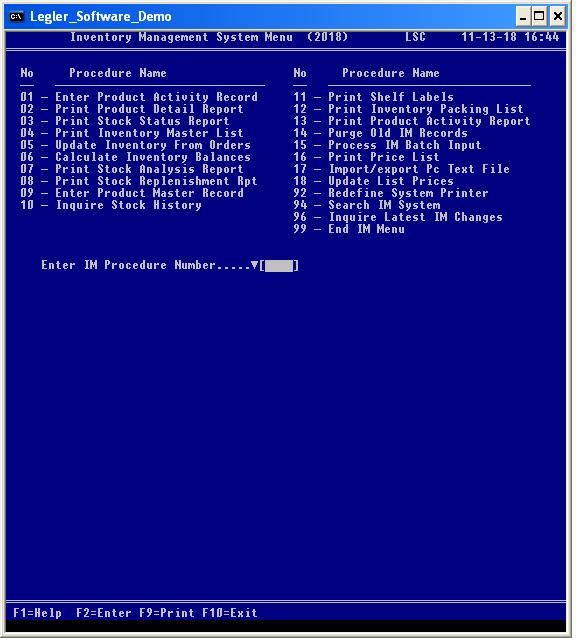
The latest version of the Inventory Management System menu by Legler Systems in CA identifies 18 separate inventory management (IM) computer procedures plus three database procedures (92, 94 and 96) common to all accounting applications. The online accounting procedures the user can run is specified in the User Control Record (DB08). Each end-user procedure shown on the IM menu corresponds to a separate computer program written in cobol.
Any inventory management accounting procedure is started at any time from the Inventory Management System Menu (screen image shown below) by entering a 2-digit procedure number or single-click on the procedure name with the mouse. For all IM inquiry and reporting procedures, a data selection screen is displayed so the user can enter various data selection parameters to retrieve specific data records from the online Master File and to format the output, including a report sort option. Reporting procedures print accounting information in hardcopy IM reports on letter-size paper, while inquiry procedures display information in a results screen. The IM reports can be viewed in a separate report window before being printed. Active keyboard function keys are shown at the bottom of all IM screens.
Data entry procedure IM01 is used to enter a Product Activity Record for a stock transaction of the quantity sold or quantity received in the IM System. A separate sequence number from 9998 is assigned to each stock activity transaction. Up to five stock transactions are physically stored in a single Product Activity Record to minimize response times. Procedure IM01 supports dynamic linking to the IM09 screen when function key F7 is pressed. To view a sample Product Activity screen, click IM01 screen image. Data fields in the Product Activity Record are defined in cobol copy member SLDPAR.
Reporting procedure IM02 prints the Product Detail Report containing stock transactions entered in online procedure IM01 or procedure IM05. The Product Detail Report (IM02) is used for operator verification and balancing. A separate Product Detail Summary report by transaction date can be requested and printed when the Entry Correct prompt equals "S".
Reporting procedure IM03 prints the Stock Status Report showing current quantity on-hand, reorder point and economic order quantity (EOQ) for each item in inventory. This IM end-user procedure can be done at any time. To view a sample of the IM03 data selection prompts and IM report, click IM03 screen.
Reporting procedure IM04 prints the Inventory Master List for active and inactive products in inventory by Item-Group code. Information in the Inventory Master List (IM04) is from the Product Master Record (IM09). To manually lookup an item number, the Inventory Master List should be sorted by item name (Alpha-Sort) or name initials. A separate Inventory Master Summary report by Item-Group code can be requested and printed when the Entry Correct prompt equals "S".
Update procedure IM05 creates a Product Activity Record (IM01) for each item sold by reading Customer Order Records (OE System) with a Order-Status code of 51. The Update Control Report is printed for audit documentation along with the elapsed run time in seconds. Computer procedure IM05 can be run as required.
Update procedure IM06 calculates the value of each item in inventory. The results of these inventory calculations (reorder point, EOQ and annual usage) are printed in the Inventory Calculation Report (IM06) and stored in the Product Master Records. Computer procedure IM06 is generally run once a month.
Reporting procedure IM07 prints the Stock Analysis Report showing the profit margin associated with each product in inventory. The gross margin (dollars and percent) is computed for each item shown in the Stock Analysis Report (IM07). Computer procedure IM06 is run as needed.
Reporting procedure IM08 prints the Stock Replenishment Report that identifies the products (items) with an on-hand quantity below the reorder point. The Stock Replenishment Report (IM08) is used as a guide for placing purchase orders with suppliers (vendors).
Data entry procedure IM09 is used to enter a master record for each product or service carried in inventory and sold by the company. Products are grouped by an Item-Group code. A standard revenue account code is defined for each product to minimized data entry procedures when entering customer orders in procedure OE01. Computer procedure IM09 is the same as procedure OE09 in the Order Entry System. To view a sample Product Master screen click IM09 screen image. Data fields in the Product Master Record are defined in cobol copy member SLDPMR.
Inquiry procedure IM10 displays a results screen of all stock activity transactions ("in" and "out") for an item in inventory within the transaction date range and other data selection parameters entered on the selection screen. The most recent stock transactions are shown first. This IM end-user procedure can be run at any time to display stock transactions. Procedure IM10 supports dynamic linking to the IM01 screen when function key F7 is pressed. To view a sample of the IM10 data selection prompts and output results screen, click IM10 screen.
Reporting procedure IM11 prints shelf labels for placement on inventory bins. Various size shelf label forms are supported by procedure IM11.
Reporting procedure IM12 prints the Packing List of item ordered on letter-size paper for mailing to the customer. The Order-Status code is automatically updated from 11 to 13 when the final inventory Packing List (IM11) is printed.
Reporting procedure IM13 prints the Product Activity Report showing the dollar value or quantity (in and out) of each item in inventory by month for the last 6 months. Management can use the Product Activity Report (IM13) for making decision about the items to carry in inventory.
Update procedure IM14 deletes old Product Activity Records (IM01) and inactive Product Master Records (IM09) from the online database or prints only record counts by year. The Purge Control Report (IM14) is printed for audit documentation and includes record counts and the elapsed run time in seconds. Only supervisory personnel should run this procedure.
Auxiliary data input of stock activity transactions (Product Activity Records) are processed at one time by procedure IM15. These stock transactions (sales and purchases) are stored in the import Transfer File (fixed format) and were created by an external billing application or by procedure IM17 or by update procedure DB18. Procedure DB18 reads a comma separated values (csv) file of stock transactions to reformat and write them to the import Transfer File. The IM15 program edits each stock activity transaction, similar to online procedure IM01, before adding them to the online database. Multiple stock activity transactions are processed at one time. The Batch Input Report (IM15) is printed to identify any input errors and record counts for audit documentation along with elapsed run time.
Any Product Master Records in the import Transfer File are processed and added to the online database for use by the OE System and IM System.
Reporting procedure IM16 prints a standard Price List for each product or service offered by the company. A separate Price List (IM16) can be printed for each Item-Group code.
Update procedure IM17 reformats csv data in a PC Text File into the Product Activity Record (fixed format) and writes them to the import Transfer File for subsequent processing by procedure IM15. A Control Report (IM17) is printed to document record counts for audit control along with elapsed run time in seconds. Update procedure DB18 performs the same import and export function with additional options.
Update procedure IM18 reads the current Azerty product catalog to update the list price and cost in the Product Master Records (IM09). Computer procedure IM18 is generally run quarterly.
Redefine system printer procedure IM92 allows the user to redefine where management reports are to be printed. If a disk file is specified, the IM report is written to a disk file from which it is displayed in a pop-up report window (92V) and then printed on paper by pressing function key F9. The computer program DBS892 associated with procedure IM92 is the same for all accounting modules. Computer procedure IM92 can be done at any time.
Search procedure IM94 is used to search the IM System for any dollar amount, code value or text in the last x months and display a results screen of search results along with the database record counts searched and found. The computer program DBS894 associated with search procedure IM94 is the same for all accounting modules. This IM end-user procedure can be started at any time to lookup any inventory information.
Inquiry procedure IM96 displays a list of the latest Product Activity Records (IM01) or Product Master Records (IM09) in descending chronological sequence by date and time. The computer program DBS896 associated with procedure IM96 is the same for all accounting modules. This online procedure can be started at any time to identify the most recent changes in the IM System.
Exit procedure 99 closes the Inventory Management System Menu and displays the main Financial Menu. To switch directly to another application procedure, just enter the System-ID plus procedure number, such as OE01, rather than three entries: 99 (end IM menu), OE (start OE menu) and 01 (start Enter Customer Orders procedure).
The IMS Procedure Manual provides complete written user documentation of over 200 pages about all accounting procedures of the Inventory Management software by Legler Systems. The IMS Systems Manuals describes the technical aspects of the inventory management application programs and is included with the cobol source programs (optional). In addition to the written documentation, the online Help File of all text and error messages (displayed in the Help Message Window when the F1 key is pressed) is included with the IMS executable programs.
For additional information on the IM software and a free demo on USB flash drive for any version of Microsoft Windows, e-mail Bill Legler in the SF Bay Area, California or go to the Inventory Management System main page.